
📗CYNDYK: Xbox Games - FAQ
📜 Basic Information:
(How purchases work, terms of access to games, and other details.)
- Any game released for Xbox Series X|S or Xbox One is available for purchase. If you have trouble creating an account or using Microsoft and Xbox services, we can resolve these issues for you
- Payment is arranged in the chat with the manager or through the bot. You will receive an invoice via an online checkout system and can pay using any available payment method that suits you. After payment, please notify the seller and wait for further instructions
- The seller is not responsible for issues caused by failure to follow the instructions or by circumstances beyond either party’s control, such as the buyer remaining offline for an extended period after payment or having no internet connection. No refunds are provided in these cases. Replacements may be offered where possible, at the seller’s discretion
- If you request a game bundle and then refuse to pay after it has been prepared for delivery, you will no longer be able to make purchases from us
- Access to purchased games is usually provided immediately after payment. In exceptional cases, delivery may take up to 24 hours
- You can contact the seller on Telegram
🗨️Frequently Asked Questions:
Will my console or account get banned?
As long as you follow the rules for using the purchased games and comply with Microsoft’s policies (for example, by not using unofficial firmware or insulting other players in online game chats), you do not need to worry about a ban.
I accidentally turned off my console / did not respond for a long time after payment / disconnected from the internet / changed my mind about playing the game. Can I get a refund?
Unfortunately, no. If you violate the terms of use or choose not to activate the games, a refund is not available. Once we send you the login details, the transaction is considered complete. However, we may be able to offer a replacement in certain cases.
✍️ Terminology:
🎮 Activation Methods:
🟢Standard:
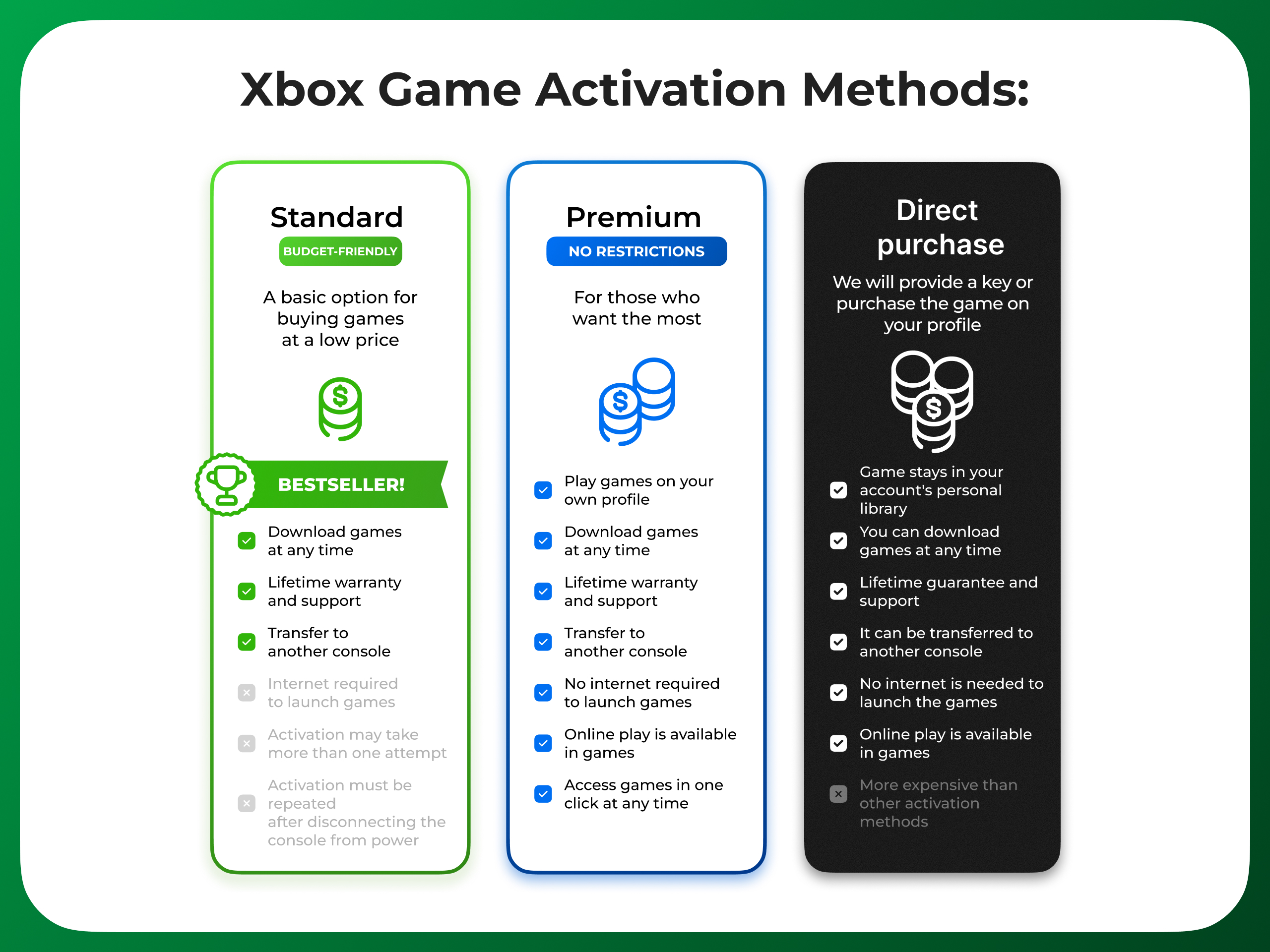
Access to games through an additional profile – A gaming profile containing the purchased games is added to your console. Access is provided indefinitely, and you will play on your own personal profile. After installation, the game is launched by following special instructions, which you can find in this article.
An affordable, budget-friendly option. A constant internet connection is required to launch games.
Rules of use:
- Changing the details of the added profile, including its name and icon, is prohibited
- Signing in to it from a computer, phone, or any other device is prohibited. If you violate this rule, further access will be discontinued without a refund of the amount paid
- Playing on the added profile is not allowed – use your own personal profile
- Activation is required before the first launch. The manager will provide detailed instructions and help you follow the steps. The game will not launch without activation
- Games can be deleted and downloaded again at any time
Possible launch error:
Sometimes an error may appear when launching a game, making it temporarily unavailable. It usually disappears on its own within 10 minutes to 10 hours, but in some cases it may persist longer.
If the error persists, contact the manager. We will help you understand the situation and find a solution.
🟣Premium:
Access to games with “Home Xbox” activation – A profile containing the games is added to your console, and the console is designated as its home Xbox. After activation, you can play using your own personal account.
Features:
- Launch games at any time. You can play without an internet connection in games and modes that support offline play
- Use online modes with an internet connection and the necessary subscription, if required by the game
- Delete and redownload games at any time
- If you change consoles, the profile can be transferred. Contact the manager for details on the transfer process
Rules of use:
- Adding and activating the provided profile is only permitted on an Xbox console
- Signing in to it from a computer, phone, or any other device is prohibited. If you violate this rule, further access will be discontinued without a refund of the amount paid
- Play only using your own personal account
🟡Direct purchase:
Direct purchase on your account – The game, add-on, or subscription is purchased directly on your personal account through Microsoft Store and added to your library. No additional gaming profile is required.
The purchased content remains on your account – you can access it using your own profile.
🧩Xbox Game Pass Subscription:
Xbox Game Pass Essential and Ultimate subscriptions – We offer official subscriptions for 1 to 12 months at competitive prices.
📌 Our current price list is available on our Telegram channel.
🔥 What’s included in Xbox Game Pass Ultimate:
- A large library of games (550+) for Xbox and PC – choose from hundreds of available titles
- New games on release day, including Xbox Game Studios and Bethesda titles included in the subscription
- EA Play at no additional cost – access to the Electronic Arts game library and service benefits
- Online console multiplayer – play with friends and other players
- Additional perks – in-game items and special offers for subscribers
No comments to display
No comments to display